Bulk invoicing
Generate invoices from approved fee records, preview the batch before sending, and keep every invoice connected to parent payments, receipts, and ledgers.

428
students
391
billable
37
skipped
Build term invoices from class, student, and fee structures already configured in Kredl.
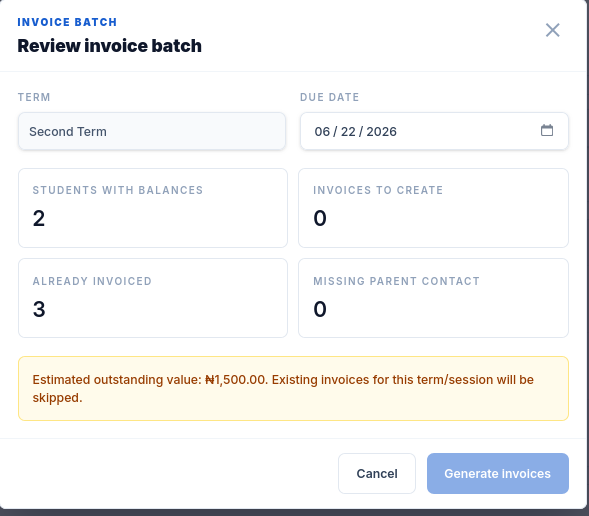
Check billable students, skipped records, duplicate invoices, and totals before committing.
Publish invoices to payer records and prepare delivery through the parent portal, email, or WhatsApp.
See draft, sent, paid, overdue, and reconciled records without chasing spreadsheet updates.


Issuing term invoices
Receiving & matching payments
Managing approvals & fee changes
Preparing for audits & reviews
Why it works
Invoices are generated from class, term, student, and fee records already inside Kredl.
Review billable students, skipped records, existing invoices, totals, and outstanding balances first.
Send invoice messages through email or WhatsApp with the right payer and student context attached.
Keep major billing changes and bulk sends behind the right review flow before records are finalized.

Control before sending
Preview protects finance teams from duplicate billing, missing parent records, skipped students, and surprise totals before invoices reach families.
Preview
before commit
Duplicate
invoice checks
Parent
delivery ready
Ledger
tracking
What you can do
Create invoice templates with school branding, payment terms, footer notes, and accent colors.
Filter students by class, term, status, search, minimum outstanding, or maximum outstanding.
Detect students who already have invoices before a duplicate batch is created.
Generate invoices from term fees and keep every invoice tied to student balances.
Share invoices with parents and keep the same records available in the payer portal.

Bulk invoicing explained
The detail view gives bursars the record behind each invoice: student, payer, amount, status, due date, payment activity, and the finance trail needed for follow-up.

Invoice operations
The invoice is not the end of the workflow. Kredl connects billing to reminders, payments, receipts, reconciliation, and debtor visibility.
Choose the class, term, student set, or outstanding balance rule that should receive invoices.
See billable students, skipped students, existing invoices, expected totals, and delivery readiness.
Finalize the batch, notify parents, and publish invoices to the parent portal.
Watch payments, receipts, outstanding balances, reminders, and reconciliation from the same ledger.
FAQ
More ways to simplify fee operations
Turn unpaid invoices into scheduled parent follow-ups without exporting debtor lists.
Keep invoices, payments, receipts, and balances connected to each student record.
Give school leadership a clear record of what was created, approved, sent, and paid.